
Dragon Tower Defense Revives: How to Revive Your Castle
How revives work in Dragon Tower Defense: when your castle is destroyed, a 7-second popup lets you revive free (daily) or by watching an ad, restoring the castle for the whole team and pushing enemies all the way back.
Quick answer
When your castle reaches 0/100 HP in a battle, a 'Castle Destroyed!' popup appears with a 7-second countdown. Pick 'Free Revive (daily)' or 'Watch Ad: Revive' before it runs out: the castle is revived and enemies are pushed all the way back, so the run continues.
- You have 7 seconds to decide, and anyone can revive it for the whole team.
- 'Free Revive (daily)' is the daily-limited free revive (per its label); 'Watch Ad: Revive' revives in exchange for watching an ad.
- The popup has no coin or gem revive cost option — these three choices are all you get in battle.
A destroyed castle in Dragon Tower Defense does not have to end your run. The moment enemies drop the castle to 0/100 HP, a popup titled 'Castle Destroyed!' appears asking 'Revive the castle?'. It displays the note 'Pushes enemies all the way back', starts a 7-second countdown, and tells you that 'Anyone can revive it for the whole team'. Accept a revive in time and your team keeps playing with the leaked enemies pushed back out of your base.
How to revive your castle
- Keep playing until the castle falls. When enemies drain the castle to 0/100 HP, the 'Castle Destroyed!' popup appears straight away together with the 7-second countdown.
- Choose a revive option in time. Pick 'Free Revive (daily)' for the daily-limited free revive (per its label), or 'Watch Ad: Revive' to revive by watching an ad. The choice has to be made within the countdown, so it pays to know which one you want before you are ever at 0 HP.
- Continue the run. The revive pushes enemies all the way back and the battle carries on. In one Nightmare-difficulty run, a player took 'Free Revive (daily)' when the castle fell at wave 60: the castle returned to a full 100/100 HP, enemies were pushed back, and the run went on.
The three options in the popup
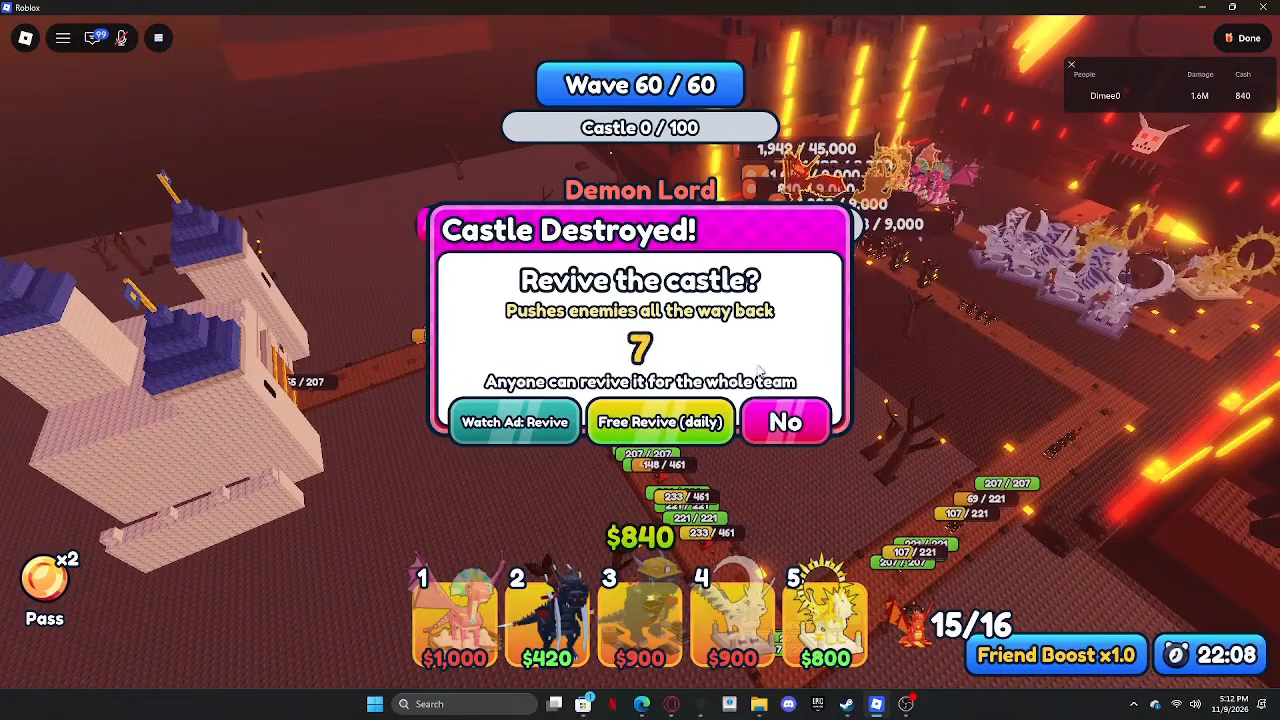
| Option | What it means |
|---|---|
| Free Revive (daily) | A daily-limited free revive (per its label). In the observed Nightmare run it restored the castle from 0/100 to 100/100 HP and pushed enemies all the way back. |
| Watch Ad: Revive | A revive in exchange for watching an ad. |
| No | Turns down the revive prompt. |
The popup contains no coin or gem revive cost option, so these three buttons are the only in-battle choices — you never need a stockpile of either currency to bring the castle back.
One revive helps the whole team
The popup says 'Anyone can revive it for the whole team', and that is exactly how it behaves in co-op play: whoever accepts the prompt revives the castle for everyone in the run, not just for themselves. If you are playing with friends, any teammate can take the revive — the restored castle protects the whole defense, so nobody has to crowd around the button.
The warning that comes before destruction
You usually get a signal before the popup ever shows. When enemies reach your base, the HUD warns 'Enemies are close to your castle: back to 1x!'. The castle only has 100 HP, and leaks hurt fast: in one Nightmare run, castle HP fell from 100/100 to 4/100 across waves 31-32, and the castle was finally destroyed at wave 60. Spotting the warning early gives you a chance to react while there is still castle left to save — the enemy waves page shows what each wave throws at you, and the strategy guide covers holding the line so you need the popup as rarely as possible.
Paid revive products in the Robux catalog
Dragon Tower Defense's Roblox developer product catalog also lists paid Revive products: 'Revive' at R$ 29, 'Revive (2)' at R$ 39, and a 'Revive (3)' product at the R$ 49 price point. These are Robux purchases that exist separately from the popup's 'Watch Ad: Revive' and 'Free Revive (daily)' options. The prices above come from a snapshot of that product list, which was shown in Brazilian reais (R$), and both availability and pricing can change — treat them as reference points rather than fixed values.
More on staying alive in long runs
The revive example above came from a deep Nightmare run, where the castle fell at wave 60 and one revive kept the run alive. If you are working your way up, the difficulties overview explains what each difficulty changes, and it is worth a quick check of current codes for free rewards that strengthen your lineup before the next attempt.